
Medicus Location Setup Guide
Before you can configure the Medicus interface for your location, it must first be enabled in INRstar by our customer services team. Call 01209 710999 and ask a member of the team to configure your location to support Medicus.
Once your location has been enabled, log in to INRstar as a user with the 'Location Clinical Lead' role.
Navigate to Options > Location Management, select the Components tab and locate the Clinical System Integration section.
Click Edit, then:
- Enter your Medicus Tenant ID.
- Select Production from the Environment dropdown.
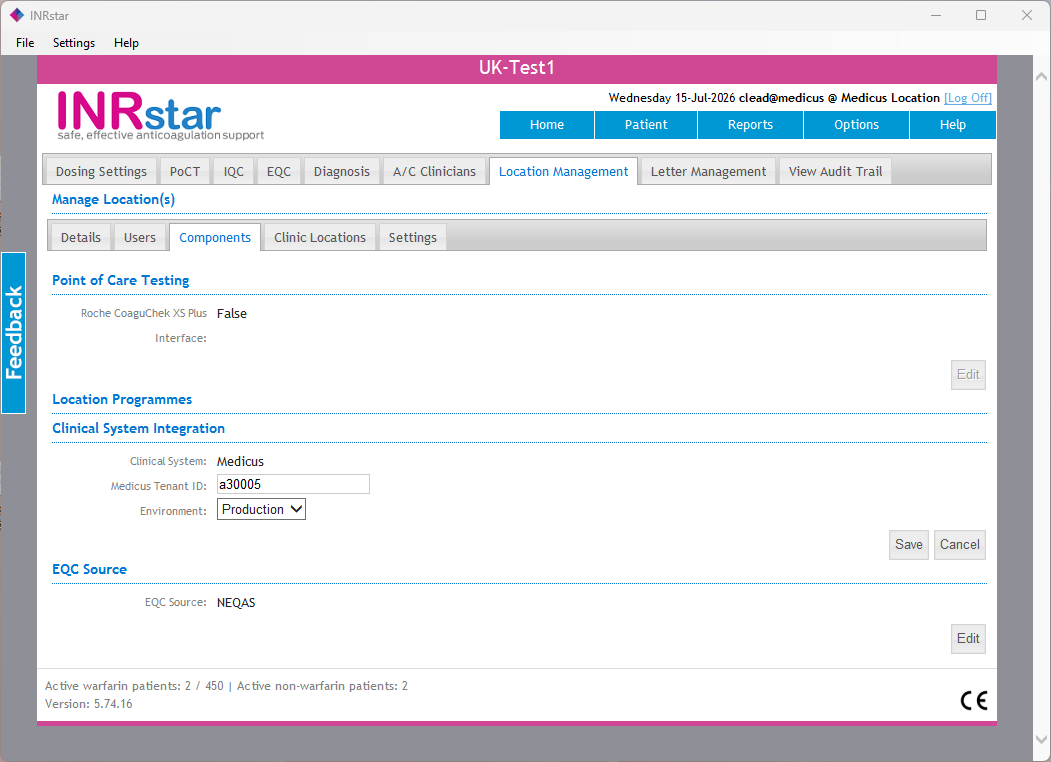
Click Save to complete the setup. The Medicus interface is now configured and ready to use for your location.
Please note: in later releases the Environment option may not be shown. Where it is not available it will automatically default to Production.
If you have any queries call us on (0)1209 710999, our team would love to help.